Study Smarter
Turn Lecture Slides Into a Complete Study System (in 5 Minutes)
Rewriting lecture slides into a Doc isn't studying — it's transcription. StudiGEMS turns any slide deck into a study guide, a practice quiz, and a set of flashcards in under 5 minutes, so your time goes toward actually testing yourself instead of copying text.
📖 What You'll Learn in This Guide:
😮💨 The Real Cost of Rewriting Slides
It's a familiar routine: a 40-slide lecture deck lands in your downloads folder, and you spend an hour retyping it into a Doc, reorganizing bullet points, and highlighting terms you're pretty sure will be on the exam. Then exam day arrives, and somehow the material still doesn't stick.
Here's the reframe: rewriting isn't studying. It's transcription. Copying a slide into a Doc doesn't force your brain to retrieve anything — it just moves text from one place to another. The activity that actually builds retention is self-testing: quizzing yourself, flipping flashcards, trying to recall an answer before you check it.
The Trade You're Making
Every hour spent retyping slides is an hour not spent testing yourself. Below is one real lecture deck turned into a study guide, a practice quiz, and a set of flashcards — the full study system — in under 5 minutes.
📂 The Example: A Real Lecture Deck, No Cherry-Picking
The video above uses an actual college safety-course slide deck, "Basics of Fire Safety." It's dense, jargon-heavy, and formatted the way most lecture decks actually look — not a cleaned-up example built to make the tool look good. If it's a normal deck like the ones already sitting in your Google Drive, the same workflow applies.
Watch the full walkthrough above, or follow the four steps below to see exactly what each tool produces.
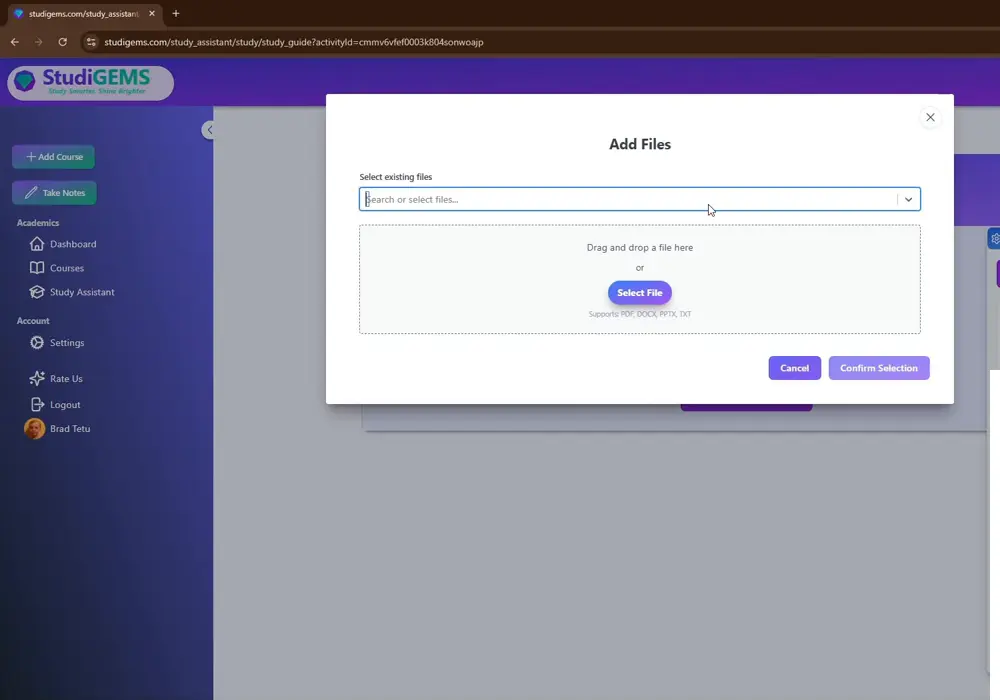
⬆️ Step 1: Import the Slides
Upload the Slide Deck (or PDF Export) Into a Course
Drop the file into a StudiGEMS course activity. It works directly from your existing course materials — the slide deck your professor already posted — so there's no manual retyping step at all.
📚 Step 2: Generate the Study Guide
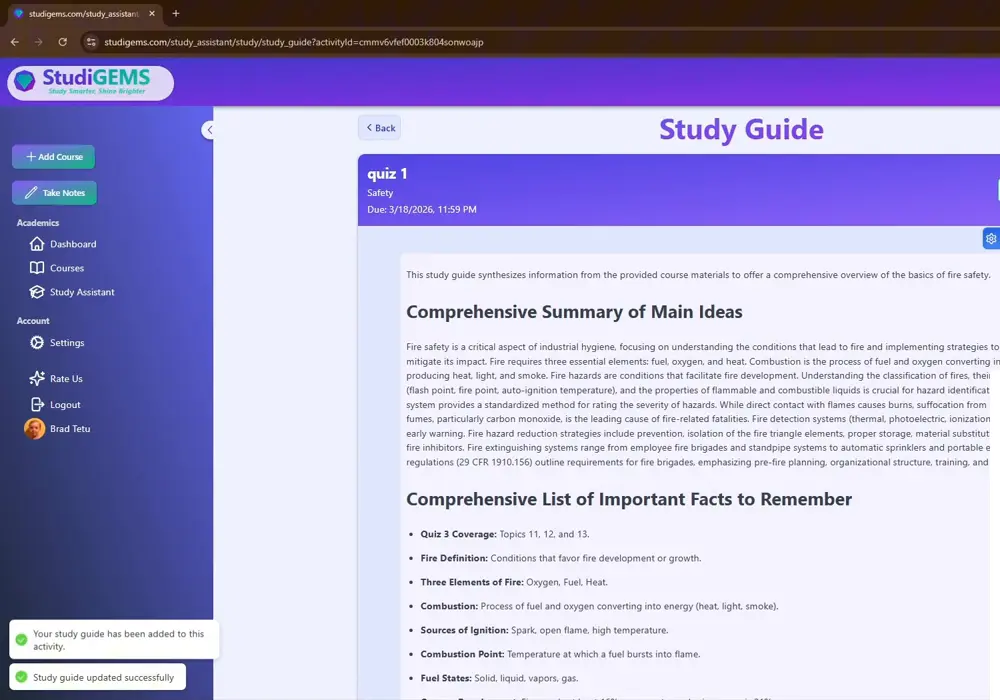
One click turns the raw slides into a structured study guide: a plain-language summary of the main ideas, plus an organized list of key facts, terms, and definitions pulled straight from the deck.
This is the point where most students would normally start manually copying slide text into a Doc. This step replaces that entire process — the summary and key-facts list are ready in seconds, not an hour.
📝 Step 3: Generate a Practice Quiz From the Study Guide
Turn the study guide into a multiple-choice practice quiz — just set how many questions you want. Worth calling out explicitly: the quiz is built from the study guide itself, not from the raw slides again, so the tools compound on each other instead of starting from scratch every time.
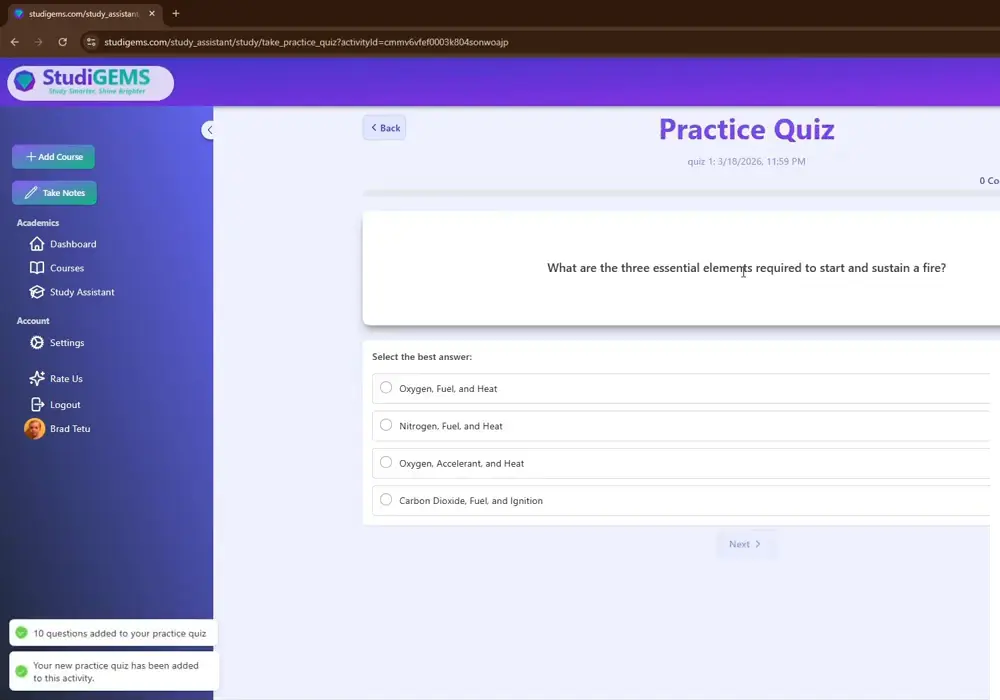
Example question from the fire safety deck: "What are the three essential elements required to start and sustain a fire?" — with multiple-choice answers and a running score as you go.
🃏 Step 4: Generate Flashcards for Memorization
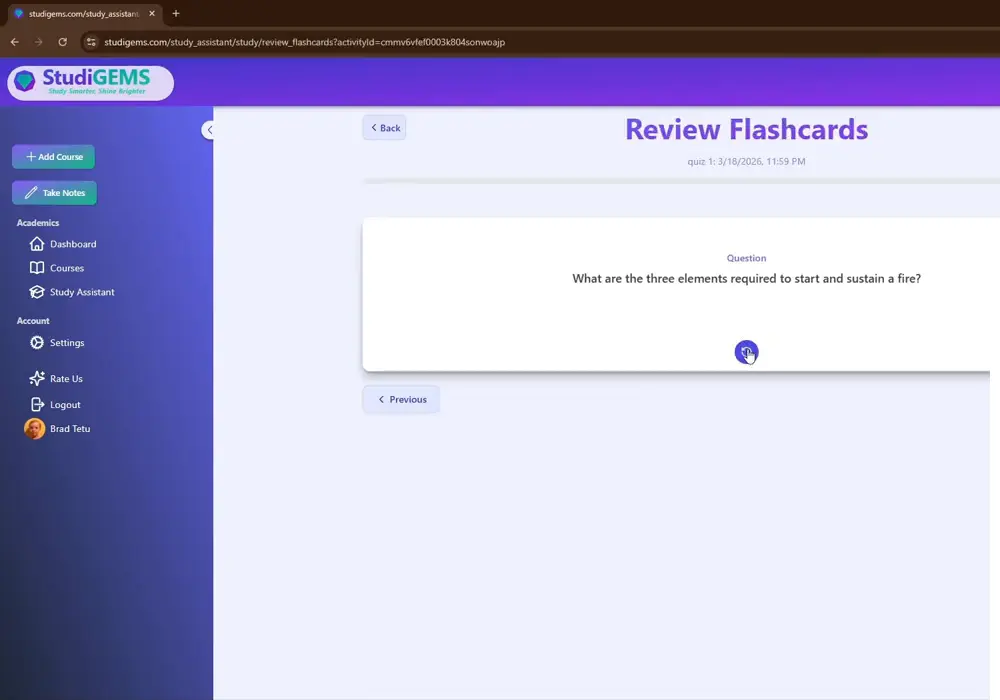
Same source material, now as flip-card flashcards for spaced review. The quiz and the flashcards serve different purposes: the quiz tests understanding and application, while flashcards build raw recall of terms and facts. Worth having both in rotation before an exam.
See the Full Workflow
Watch the 5-minute walkthrough on YouTube, then try it on your own slides for free.
🧠 Why Testing Beats Rereading
Psychologists call this the testing effect, or retrieval practice: the act of trying to recall information strengthens memory far more than passively rereading or recopying it does. Rewriting a slide lets your eyes recognize the words again. Answering a quiz question or flipping a flashcard forces your brain to actually retrieve the answer — and that retrieval is what makes the material stick.
This is also the practical case for an AI study guide generator over a manual outline. A manual outline still takes as long as the deck is dense, and once it's written, most of the studying time is already spent. A generated study guide is ready in seconds, which means nearly all of your remaining time can go toward the part that actually improves exam performance: testing yourself.
None of this requires elaborate spaced-repetition scheduling to start working. Just replacing "reread the slides" with "quiz myself on the slides" is a meaningfully different — and more effective — use of the same study time.
⚡ Recap: 5 Minutes, Three Study Tools, One Source File
- 1. Import: Upload the slide deck or PDF export into a course — no retyping.
- 2. Study guide: One click generates a summary and key-facts list from the deck.
- 3. Practice quiz: Generated from the study guide, with as many questions as you want.
- 4. Flashcards: Generated from the same source, for spaced recall practice.
One slide deck in, three study tools out, in less time than it takes to retype a single lecture's worth of slides.
❓ Frequently Asked Questions
🔗 The Rest of the StudiGEMS Toolkit
Study guides, quizzes, and flashcards are one piece of what makes StudiGEMS a complete academic success system. Once your exam dates are on the calendar, here's what else keeps you ready for them:
📅 Syllabus to Calendar
Upload a syllabus and StudiGEMS extracts every deadline, exam, and assignment, then syncs it to Google or Apple Calendar automatically — so you know exactly when to use the study tools above.
🔔 Smart Reminders
Get a nudge before each deadline instead of finding out at the last minute — giving you time to run the import-to-study-guide-to-quiz workflow before, not the night before.
📅 Study Plan Generator
Once your study guide is ready, StudiGEMS can build a session-by-session study plan around reviewing it — placed in the time you actually have open, with a method assigned to every session.
Explore the Study Plan Generator →The StudiGEMS workflow: Upload your syllabi → deadlines sync to your calendar → upload lecture slides for each unit → generate a study guide, practice quiz, and flashcards → walk into the exam having actually tested yourself, not just reread your notes.
💡 Conclusion: Skip the Busy Work, Focus on Testing Yourself
The best use of your study time isn't retyping slides — it's testing yourself on the material until it sticks. StudiGEMS handles the transcription step so you don't have to, turning any lecture deck into a study guide, a practice quiz, and flashcards in about the time it takes to make a cup of coffee.
Upload your next lecture deck and see the whole study system generate itself in 5 minutes.
Ready to Turn Your Slides Into a Study System?
Upload your own lecture slides and try it on your next quiz. Join students using StudiGEMS to turn raw course material into study guides, practice quizzes, and flashcards in minutes.
No credit card required. Try it on your own slides in under 5 minutes.